

System Map

The System Map displays a star system's layout and information. Any discovered celestial and system information is documented on the System Map. There are two display modes: the default "Map", which displays a simplified diagram of the system, and "Orrery", which displays a 3D model of the system with orbits and distances.
Access
Accessing the map of the current system can be accomplished by navigating to the ship's left side panel and selecting "System Map" at the bottom left of the "Navigation" tab.
Accessing the map for any system with discovered information can be accomplished by opening the Galaxy Map, hovering over the desired system, and then selecting the System Map in the popup.
Unless the player has already scanned all of the celestials in a system, not all information will be available when viewing the System Map. If no data is available then the System Map will fail to open. Available data can be purchased with credits either in the "Universal Cartographics" section of Station Services or via the Galaxy Map (option may be available when hovering over the target system).
Usage
Once the map has been accessed the player can pan around with WASD (default) and zoom with the mouse wheel. Available information can be viewed by moving the crosshair over any celestial; by moving the crosshair over empty space the System's general information will be displayed. Any celestials that have not been discovered will be displayed as "Unexplored" - information can be gained by using the Discovery Scanner, the Full Spectrum System Scanner and the Detailed Surface Scanner.
Orrery Mode

The System Map mode can be switched from the default "Map" to the "Orrery" in the information sidebar. The Orrery shows all the orbits of stars, planets, moons and stations with a proper scale relative to each other. It is possible to zoom in on celestial bodies and signal sources, read descriptions, and access bookmarks.[1]
Planetary Map
An additional function of the System Map is the ability to further zoom in to landable planets and moons, and examine their surfaces in detail. This is only available in the default "Map" mode, and not the "Orrery". Any outposts and settlements present on the world's surface can also be selected to display detailed information and plot a travel route. The Planetary Map can be exited by zooming back out to the full System Map.
Information
The type of information displayed varies on the object.
System
- Summary
- Description
- Controlling Faction
- Region Name
- Allegiance
- Population
- Government
- State
- Economies
- Security Level
- Star Type
- Star Class
- Gliese
- HIPP
- HD
- Factions
- Powerplay Information
- Points of Interest
- Orbital Ports
- Landfall Planets
- Planetary Ports
- Surface Settlements
- Odyssey Settlements
- Fleet Carriers
- Thargoid War
Star
- Description
- Description
- Age
- Solar Masses
- Solar Radius
- Surface Temp(erature)
- Orbital Period
- Semi Major Axis
- Orbital Eccentricity
- Orbital Inclination
- Arg(ument) of Periapsis
Asteroid Belt
- Description
- Reserves
- Ring Type
- Moon Masses
Station/Settlement/Fleet Carrier
- Description
- Settlement Type (if a settlement)
- Threat Level (if a settlement)
- Station Services
- Active
- Suspended
- Fleet Carrier Data (if a fleet carrier)
- Owner
- Reputation
- Docking Access
- Notorious Commanders
- Tritium Reserves
- Service Tariffs (if a fleet carrier)
- Shipyard
- Rearming
- Outfitting
- Refuel
- Repair
- Market Information
- Trade Data
- Economies
- Imports
- Exports
- Prohibited
- Trade Data
- Stored Ships
Planet/Moon
- Description
- Description
- Reserves
- Earth Masses
- Radius
- Gravity
- Surface Temp(erature)
- Surface Pressure
- Volcanism
- Orbital Period
- Semi Major Axis
- Orbital Eccentricity
- Orbital Inclination
- Arg(ument) of Periapsis
- Rotational Period
- Axial Tilt
- Planetary Information/Planet Details
- Composition
- Atmosphere Type
- Atmosphere (Composition)
- (Planet/Moon) Composition
- Features
- Planet Materials
- Locations
- Features
- Ring Orbit Data
- Ring Type
- Mass
- Semi Major Axis
- Inner Radius
- Outer Radius
- Composition
- Organic Information
- Stored Ships
Icons legend
Icons found in System Map menus.
| Icon | Description | Context | Notes |
|---|---|---|---|

|
Planet has (thin) atmosphere / Base is on that kind of planet | 
|
This icon in the corner of menu card means the planet is only landable / installation is only reachable in a game with Odyssey expansion. Because landing on atmospheric planets is only possible in this game version. Officially 'planet with tenuous atmosphere'. |

|
landable planets |
|
Player can land their ship on these planets. Officially 'Landfall planet'. |

|
Horizons 'Planetary ports' - large bases on planet surface |
|
Player docking permitted. Offers services. |

|
Horizons 'Planetary settlements' - small bases on planet surface |
|
Player docking NOT permitted. Usually designated as trespass zone. They exist as mission targets for Horizons expansion planet surface missions. Made to be accessed in SRV. |

|
Odyssey 'Planetary settlements' - small bases on planet surface |
|
Player docking permitted. Offers services. Part of Odyssey expansion. But accessible in base game (resp. Horizons expansion). Made for walking around and 'On foot' missions and activities. Commonly has only one landing pad. |
Icons found in System Map system view.
| Icon | Description | Context | Notes |
|---|---|---|---|

|
non-landable planet | No ships can land on this planet (because landing on this type of planet it is not implemented in current version of the game) | |

|
landable planet | Player and NPCs can land their ships on this planet 'Landfall' planet | |

|
landable planet, with known bases | There are already discovered bases on the surface | |
  |
landable planet, requiring permit | Planet is landable, but player requires permit to be able to land. 'Permit locked' | |

|
planet with atmosphere, (non-landable) | Size of the blue corona actually changes between planets based on planet's atmospheric pressure. | |

|
landable planet, with thin atmosphere and known bases |
| Icon | Description | Context | Notes |
|---|---|---|---|

|
Your stored ship(s) | One or more of your ships are stored in this base / in a base on this planet | |

|
Planet has Surface Conflict zones | 
|
Some small bases (Odyssey 'Planetary settlements') on this planet are under attack from a human faction; and became Planetary surface (On foot) Conflict zone |
Notes
- The Orrery System Map mode was added in Elite Dangerous: Beyond Chapter Four (3.3).
- An early concept of an orrery map was first shown in Newsletter #22.[2] Frontier's Dale Emasiri commented on November 2, 2017:
- "There's a lot of factors to consider with something like this. What does it really add? I'm not disputing the fact that the orrery view would be immense and show things off in such an awesome way, but it has to be easily usable. There's so much data to show, so many different aspects of the game that need to be/could be visualised to give a greater experience. This is a huge technical challenge not just from a 'how do we display the stellar/planetary bodies' angle, but also you have to consider what data would be relevant to explorers, what would be relevant to mission/passenger runners, combat pilots, system states, trading, and so on. There's so much data in the game, and it would be great to show it all. But each thing is a 'cost' as far as development, querying the data, system resource, and also screen space. These are only the things that I can think of from the perspective of someone who doesn't really know the first thing about effective UI design, and that's already a tough set of questions to answer..."[3]
- "I wish I understood the finer points of UX/UI design to really engage in conversation here more... but I don't. Every so often the topic comes up internally and people think a bit more about it, but please don't hate me for setting a realistic expectation: it's an unlikely thing for us to see within the foreseeable future. Just know that I, and probably quite a few others, would love to see this feature in game. Actually, there's a lot of these kinds of features we'd love to see... hence the 'wishlist'."[3]
Videos
Gallery
-
 System View
 -
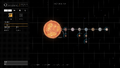 Trappist-1 system map
 -
 Sol system map
 -
 Orrery system map
 -
 Orrery system map concept
 -
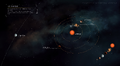 LP-98-132 orrery system map concept


